The We-Right Factory team will research the advantages of Quetext and indicate whether a premium subscription is necessary. We’ll talk about available features and complete a test to see whether the results are accurate.
Our reviews follow strict editorial rules and rely on independent testing and research. We may receive compensation through affiliate links, but this never shapes our conclusions or rankings.
More than two million users, including students, teachers, and professionals, rely on Quetext for plagiarism checks. Launched in 2012, Quetext is an online tool that scans essays, research papers, articles, and other written work for copied content. It compares submissions against its own databases and external sources, then generates a report that flags potential matches so users can correct issues and maintain the originality of their texts. In this article, We-Right Factory experts will talk about the key benefits and drawbacks of this service and carry out our own test to see whether Quetext provides accurate results.
What Is Quetext?
Quetext is a plagiarism detection tool that helps writers, students, teachers, bloggers, and publishers confirm content originality. Its developers built a proprietary system called DeepSearch. Unlike basic checkers that match isolated words and phrases, DeepSearch analyzes context to identify meaningful similarities.
Quetext also relies on a large comparison database. Each scan checks content against 20+ million books, billions of web pages, and more than one million academic journals.
The homepage of the Quetext service
Features of Quetext
The service offers multiple tools to help students and content writers check and edit their work for plagiarism. The available features of Quetext include:
DeepSearch Technology. Quetext scans your document against web pages, academic papers, and its own databases. It can catch subtle plagiarism, like patchwriting, and provides guidance on how to correct it.
Plagiarism Reports. The reports highlight matching text and use color codes to show how closely it matches other sources, making it simple to identify problem areas at a glance.
Multiple File Formats. The Quetext service works with Word documents, PDFs, plain text files, and other common formats.
Citation and Reference Help. The instrument spots missing or inconsistent citations and shows you how to fix them.
Exclude Sources. You can choose to ignore certain sources, such as intentionally quoted material or widely known facts, so your report focuses on what matters.
Our We-Right Factory experts find the Exclude Sources feature actually useful, as we often quote industry specialists and statistical resources in our materials. This helps us avoid high plagiarism percentages in our work.
Subscription Levels of Quetext
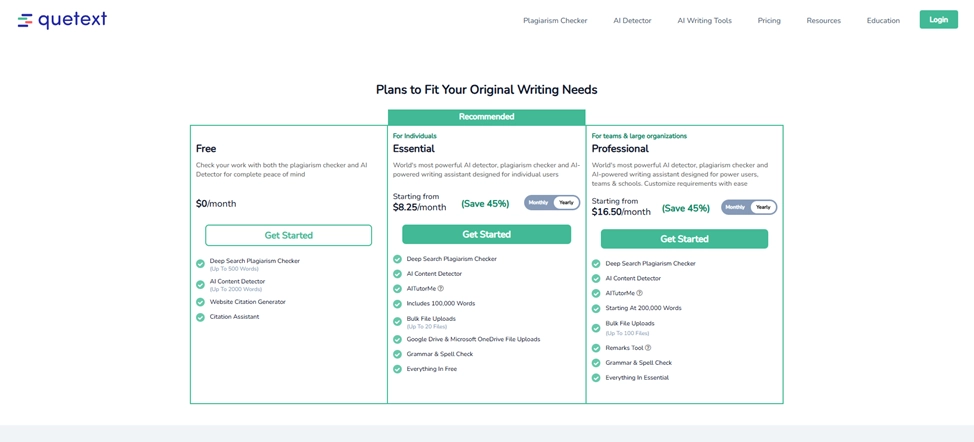
For new users, Quetext provides a Free version with 500+ words of plagiarism detection and 2,000+ words of AI recognition. In addition, the Free version offers a website citation generator and citation assistant. For those who want to access more advanced features, there are two subscription levels available: Essential and Professional. In the table below, you can see the perks users can access on each of these levels.
Feature
Essential Level
Professional Level
Deep Search Plagiarism Checker
✅ Included
✅ Included
AI Content Detector
✅ Included
✅ Included
AITutorMe
✅ Included
✅ Included
Word Allowance
100,000 words
Starting at 200,000 words
Bulk File Uploads
Up to 20 files
Up to 100 files
Google Drive & Microsoft OneDrive Uploads
✅ Included
✅ Included
Grammar & Spell Check
✅ Included
✅ Included
Remarks Tool
❌ Not included
✅ Included
Everything in Free Plan
✅ Included
✅ Included
Customization for Teams/Schools
❌ Not included
✅ Included
Comparison of Quetext Subscription Plans
Here at the We-Right Factory team, we think that the Essential level is the top choice for students, teachers, and copywriters. It offers tools to ensure originality, improve writing, and generate correct citations on a smaller scale. The Professional level is built for larger teams and organizations. It offers scalable, secure access with word-based pricing, bulk uploads of up to 100 files, and additional features like remarks, compared to the 20-file limit in the Essential plan.
Free, Essential, and Professional Subscription Levels in Quetext
How to Use Quetext?
Quetext has a user-friendly interface, which makes it easy to use even for beginners. You can either use a Free plan with 500 words or create an account and access more checks. We have prepared step-by-step instructions:
Go to the official website of Quetext and click the blue Get Started button in the upper-right corner.
Fill out the enrollment form with your first and last names, your profession, email, and password. You can also get authorized using your Google account.
Pick a subscription level and then complete a payment using any convenient method.
As soon as your account is topped up, click the New Check button located at the top of the interface.
Paste the text or upload a document. Then, specify whether you want to check plagiarism, AI, or both.
Within minutes, your results will be ready. You can check what fragments are marked red and edit them right in Quetext.
Our Undiluted Test of Quetext
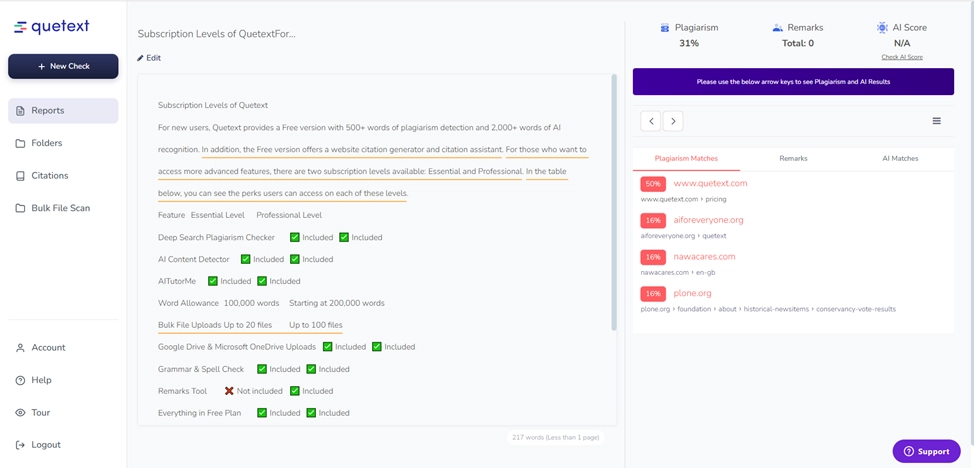
As with every service we review, our team tested Quetext to ensure the results of checks are accurate. So, we decided to start with a fragment of this text that discusses the subscription levels. The test showed a fairly accurate result of 31% plagiarism, as some of the information was taken from the official website.
We Tested Quetext – Here’s What It Gets Right (and Wrong)
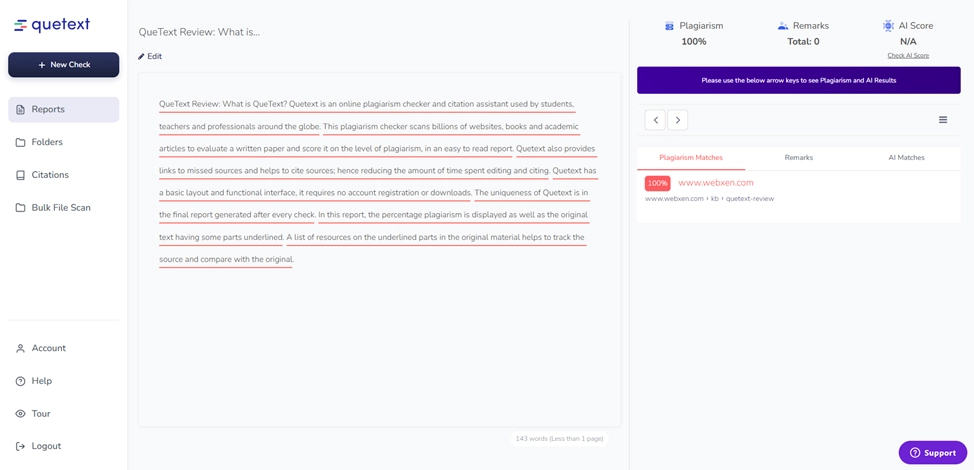
Then, we decided to check a completely plagiarized text. We copied a fragment of content from another Quetext review and pasted it into the check form. As a result, the text was correctly marked as 100% plagiarism.
Quetext Accuracy Review: What Writers Should Know
Based on this quick test, we can confirm that the service precisely identifies whether the content has been copied from another website or poorly rephrased.
The best way to understand whether Quetext is a suitable choice for you is to check its advantages and disadvantages. See the table below.
Pros
Cons
Free Plan Available. Includes basic AI and plagiarism scanning at no cost.
Low Free Limit. Free checks allow up to 500 words, which falls short for most essays.
No Text Storage. Submitted text is not saved in a database.
Limited Source Coverage. The search prioritizes web pages and does not fully cover academic databases.
Deep Scan Detection. Identifies rewritten and lightly modified sentences.
Shared Subscription. Allows account sharing to reduce individual cost.
Quetext – Advantages and Disadvantages
Common Issues with Quetext and Troubleshooting
When using Quetext, people often face similar issues. We have researched the most common problems and found solutions for each of them. You can examine the table below.
Issue
Solution
No plagiarism found on copied text
This points to a false negative. Check the text with another tool or search suspicious phrases manually.
High plagiarism score on original work
Review the flagged sections closely. Common phrases and industry terms often trigger matches. Focus on unique strings longer than 8-10 words.
Proper citations flagged as plagiarism
This reflects a known limitation. Verify citation accuracy and ignore these flags. Keep a record if you submit the work to an instructor.
Scan fails or times out
Split large documents into smaller parts. Files over 10,000 words often cause processing issues.
Credits deducted without results
Contact support right away. Take screenshots and keep records, as resolution may take several days.
Common Issues with Quetext
Recommendations on How to Use the Quetext Service
Our We-Right Factory experts created a list of basic recommendations for content writers and other professionals to help you achieve the most transparent results in Quetext. These are the things to consider:
Upload the Entire Document. Submitting only part of your work can lead to incomplete or inaccurate results. Make sure to upload the full text.
Check Different File Formats. If your document exists in multiple formats, run each version. Various formats can produce slightly different results across the databases of Quetext.
Review the Report Carefully. Look closely at flagged sections and compare them to the original sources. Decide whether you need to add a citation or rephrase your text to avoid plagiarism.
Use the Citation Assistant. Quetext highlights potential citation issues and guides you on formatting them correctly.
Alternatives to Quetext
There are many decent alternatives to Quetext. We have added some of them to the list below:
Grammarly. Grammarly stands as the closest alternative to Quetext in both features and price. It works as a full grammar tool and fixes over 400 types of errors. Its plagiarism checker provides detailed tests and shows the percentage of copied content in a document. Grammarly also includes proofreading and other writing tools that help improve clarity and overall quality.
Duplichecker. As a free alternative to Quetext, Duplichecker is a solid option. The service allows up to 1,000 words per scan, which doubles the 500-word limit offered by Quetext’s free plan.
Small SEO Tools Plagiarism Checker. SmallSEOTools offers a simple but reliable plagiarism checker. Bloggers, writers, and freelancers use it for quick checks of originality.
Our Expert Opinion on Quetext
In our opinion, Quetext is one of the best tools for people who work with content, as it provides some of the most precise plagiarism-check results. The instrument accurately identifies the percentage of the text that has been plagiarized and highlights problematic areas in red. It also offers useful tools like Citation and Reference that help to indicate what parts of the text are quotes and exclude them from the check.
However, the Free version of the service only allows you to check 500 words. For more words, you will need to opt for a premium subscription.
Frequently Asked Questions About Quetext
Who can use Quetext?
Students, teachers, writers, creators, businesses, and researchers use Quetext to check originality and citations.
Which file formats does Quetext support?
Quetext accepts plain text and document uploads in .doc, .docx, .txt, and .pdf formats.
How long do Quetext scans take?
Most scans finish in seconds or a few minutes, depending on file size and traffic.
Can you save reports in Quetext?
Yes. Paid plans allow saving and downloading plagiarism reports in Quetext.
What are Quetext’s limitations?
Quetext cannot detect sources that are not online, may miss heavily rewritten content, and can flag common phrases as plagiarism.
Olga leads We–Right Factory and has been working with content and SEO for over 10 years. She collaborates with global agencies and brands and builds niche portals such as Gosta Media, Harni News, Toplinker.io, and Serphot. Olga writes about SEO strategy, content operations, link building, multilingual projects, and regulated niches like iGaming and finance, based on real projects and hands-on experience in international markets. She is also directly involved in developing long-term SEO and content strategies for international brands.
Grammarly and QuillBot solve different writing problems, and choosing the right one depends on what you actually need. We tested both tools in real writing scenarios – from grammar-heavy drafts to paraphrasing tasks – and broke down six key differences that matter in practice, not in marketing claims.
Smodin.io helps you verify text originality, detect AI-generated writing, check plagiarism, and ensure grammatical accuracy. Discover its top 5 tools, pricing, and expert insights in our full review.
We-Right Factory experts will research the features of the Surfer SEO service and determine whether they are efficient. The article also contains information about premium plans and a registration guide.
Our We-Right Factory SEO specialists will talk about three of the most popular keyword density checker tools: Istio, Seoscout, and Checkserp. We will explain how to use these services and their key benefits.
Our We-Right Factory copywriters will complete the ZeroGPT review and determine whether this service is helpful. We'll also compare different premium subscription levels and provide steps for getting started.
The We-Right Factory team will share all the details about the Copywritely service, including all the available instruments and key benefits and drawbacks. We will also share a simple registration instruction.
Want to know if a text was written by ChatGPT or a real person? Explore the best AI detectors for Google Chrome – tested tools that reveal how authentic your content really is. We reviewed their features, accuracy, and integrations to help you choose the most reliable option for everyday use.
Explore 7 must-have tools for copywriting that streamline your writing, improve SEO, and help you check AI content that ranks, converts, and saves you hours every week!
Our team at We-Right tested QuillBot’s Paraphraser, Grammar Checker, and AI Detector in real scenarios. In this review, we share what worked well, where the tool struggled, and whether it’s worth using. After weeks of testing, we’re ready to give you an honest verdict.
We tested Undetectable, Copyleaks, and ZeroGPT to verify the accuracy of their 99% claims. In this review, our team shares test results, highlights strengths and weaknesses, and recommends which AI detector is worth your trust. After weeks of experiments, we’re ready to give you an honest verdict.

 EN
EN
 UA
UA
 Blog
Blog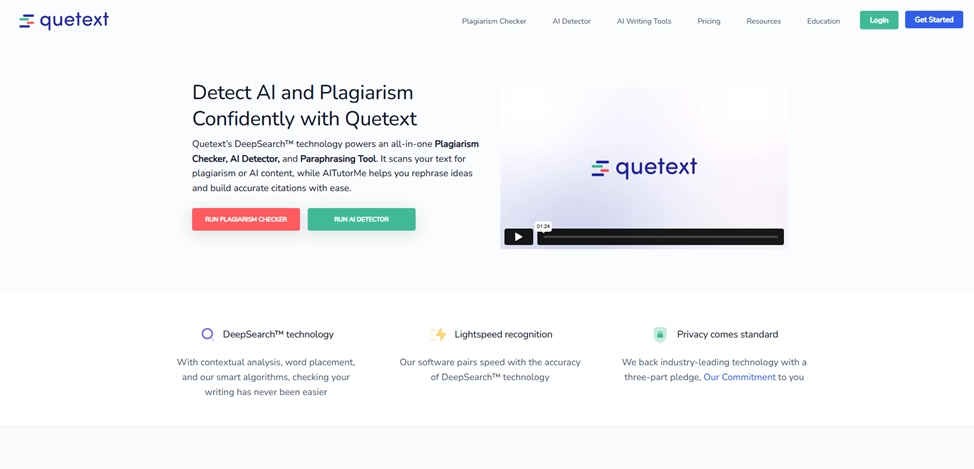



 February 23, 2026
 173
173

 January 24, 2026


